The On It Studio
What Goes in a Product Launch Decision Log Template? 6 Fields
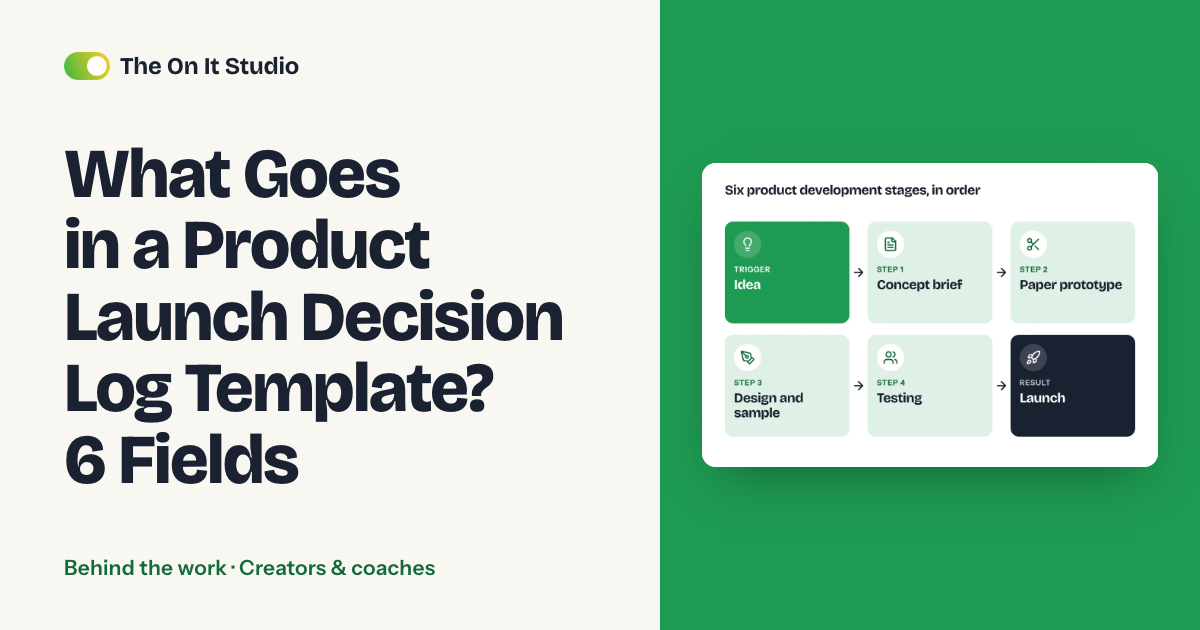
If your first product lives in a supplier email thread and a notes app full of half-remembered calls, this guide is for you. We'll build a product launch decision log template with six fields, one row per decision, in the spreadsheet or app you already open each morning. Setup takes an afternoon, and your first row can be a call you made last week. It's the log we'd add next time alongside the launch checklists we ran on seven kids products.
What should a product launch decision log template include?
Six fields for each choice: the decision, the options you rejected, the reason, who decided, the date, and what would make you revisit it. On a first physical product, you'll write rows for costing, run size, sampling, packaging, safety testing and labeling, fulfillment and timing.
Here's the part nobody tells you: the decision field is the one you'll read least. The cell you'll open is the rejected option and its reason, because your second product starts from whatever you've already ruled out.
Say re-checking one rejected option (a material, a box, a supplier) eats about 3 hours of emails and quote comparison, and you reopen 4 of them over a launch. That's 12 hours. Time yourself for two weeks and swap in your own numbers. With the reason sitting in the row, you spend a minute reading it instead of three hours asking suppliers the same questions again.
Why isn't a launch checklist enough?
The creative part of a product is short and the admin around it is long. We learned that taking seven physical products from idea to printed and sold for a kids wellness brand, and the Yogapalooza case study has the full project.
The brand makes music, yoga and mindfulness material for classrooms and families, with a small team running new products, a Shopify store, school partners and live events at once. Among the seven products were a kit, a card deck, a book with a plush toy and an audio card.
We ran each product as a checklist with owners and dates, and that's how seven launches got out the door. On a run of seven, we'd expect the same kinds of choices to come back each time: materials, packaging, run size, labels. A typical checklist row says "Packaging: done," with a name and a date. It has no cell for the box you turned down or the reason you turned it down.
If we ran those seven again, we'd start a decision log next to the checklist on day one. The rows further down show the format with sample choices, so you won't find client numbers in them.
How do you fill in the six fields?
Fill them in this order. Each field sets up the next.
Step 1: Write the decision as one checkable sentence
- Write the choice with its specifics: "Outer box: single-wall mailer, printed one color."
- Skip notes like "discussed packaging," which record a meeting you can't check later.
- Test: someone who missed the conversation reads the row and orders the right box.
Step 2: List the options you turned down
Name each alternative you looked at, even if there were only two. Product two starts from this cell, so make it easy to find.
- Write it the way you'd search for it later: "double-wall box, rejected."
- Test: when product two needs a box, this row saves you the afternoon you'd spend finding out again why one option lost.
Step 3: Give each rejection a reason you can test
Leave the reason blank and you'll reopen the option, since you can't tell whether the old objection still holds. This is the step that slips when you're busy.
- One line per rejected option.
- Swap "too expensive" for something checkable: "adds a packing step for a two-person team."
- Test: a teammate can tell from the reason alone whether it still applies.
Step 4: Name one owner
- Type one person's name in the Owner cell. If two people each assume the other decided, neither of them writes the row.
- Test: filter the Owner column for any cell that says "team" or "us."
Step 5: Date it the day you decided
- Enter the date you made the call, even if you write the row up later.
- Test: the date matches the message or call where you agreed it. If the two drift apart, you're filling in the log after the fact.
Step 6: Add a revisit trigger
- Write the condition that would change the answer: "Revisit if pre-orders pass the run size."
- Test: picture a bigger second run and ask whether the trigger fires. A call that made sense at a small first run can go wrong at a bigger one, and this cell is where you'd spot it.
What does the template look like, row by row?
One row per decision, nine columns. Add ID, Stage and Status to the six fields and the log doubles as your launch checklist. Copy the headers, then replace these sample rows with your own.
| ID | Stage | Decision | Rejected | Why rejected | Owner | Date | Revisit if... | Status |
|---|---|---|---|---|---|---|---|---|
| D01 | Costing | Material that matches the sample you liked | Cheaper material | Felt thin when held | You | (date) | A new quote beats it at the same feel | Decided |
| D02 | Run size | Smaller first run | Larger run, lower unit price | Ties up the cash you'd need to reorder | You | (date) | Pre-orders pass the run size | Decided |
| D03 | Sampling | Approve a pre-production sample | Approve from photos | Photos can't show how the insert fits | Ops lead | (date) | Supplier ships a proof first | Decided |
| D04 | Packaging | Mailer box | Rigid gift box | Adds a step at packing | You | (date) | Order volume changes | Decided |
| D05 | Safety and labeling | Test before the print run | Test after the first batch | A failed test strands finished stock | You | (date) | The design changes | Open |
| D06 | Timing | Ship window the supplier confirmed | A tighter date | Supplier didn't confirm it | You | (date) | Supplier confirms an earlier slot | Decided |
Add pre-order and fulfillment rows the same way once you reach them. A ship window you promise customers belongs in the log because it had a rejected option too, as D06 shows.
Sort by Status, then by Owner, and each Open row reads as a task with a name on it. If you haven't costed the product yet, costing a product before ordering samples gives you the numbers that go into D01 and D02.
Where should the log live?
In the smallest tool your team already opens daily. You'll write more rows in a messy sheet you check each morning than in a tidy new app you open twice.
- Notion: its database properties let you filter, sort and search your data, so Stage, Owner and Status work as filters.
- Google Sheets: you can create a named version in version history so your versions aren't merged. Name one "pre-sample" and another "pre-print."
- Airtable: each form submission becomes a new record in the table where the form view was created, which suits a supplier contact or collaborator adding a decision without opening the log.
If you live in a sheet, stay in the sheet and keep the columns on one screen. Your team will skip a row they'd have to scroll sideways to fill in.
What breaks, and what would we do again?
Four things break a log, and you can check for all of them in ten minutes.
- Entries written weeks later. You rationalize the reason and forget the rejected option, so the row stops being evidence.
- Rows with no owner. They sit at Open for a month because nobody's name is on them.
- A log that stays closed until product two is half done. Put "read the log" on the checklist for the first week of the next product.
- Too many rows. If you're logging which font you tried, the real decisions get buried, so log what's costly to undo.
If you can't fill the Rejected cell for a row, you probably haven't decided yet.
The toy fair booth decision log uses the same format for a trade show booth. More of our field notes sit in the Behind the work hub, and the creators and coaches hub collects guides for going from audience to product.
Start with one row: the decision you made most recently, the option you turned down and why. It takes about ten minutes, and trying to fill the "Why rejected" cell tells you whether you could defend that choice to a supplier.
The On It Studio is an operations and automation studio, and if you're launching your first physical product as a creator, we can take on the admin around it, or you can send us your week through the free ops audit and we'll tell you which three jobs we'd take off your plate.
Frequently asked questions
What is a product launch decision log?
It's a running list of the choices you make while taking a product to market, one row per choice. Each row records what you chose, what you turned down, why, who decided, when, and what would make you reopen it.
How many decisions should I log per product?
We'd start with one row for every choice that costs money or time to reverse: materials, supplier, run size, packaging, labeling, fulfillment and ship date. If a choice takes five minutes to undo, it doesn't need a row.
Is a spreadsheet enough for a decision log?
Yes, if you already open it daily. The tool matters less than writing the row on the day you decide, with the rejected option filled in.
What if a rejected option turns out to be right later?
Change the old row's status and write the new decision as a fresh row that points back to it. The revisit trigger on the original row tells you when to look again, and the history shows what changed.